

Ai Smart Remote

10K+
Installs
whitesandmedia
Developer
-
Lifestyle
Category
-
Everyone
Content Rating
-
contact@aismartremote.com
Developer Email
-
https://aismartremote.com/#/privacy-policy
Privacy Policy
Screenshots
editor reviews
I first stumbled upon Ai Smart Remote while looking for a way to control my aging TV without having to juggle three different remotes on my coffee table. It's a utility app developed by whitesandmedia, and it's been around for a few years now. You can grab it directly from the Google Play store, and it's also available for iOS. The core idea is simple: your phone acts as a universal remote. Since it's free to download and install, I didn't think twice about trying it. You don't even need to create an account to start using the basic functions, which is a huge plus for me. There are ads, though, and they pop up occasionally, which is the trade-off for the free price tag. You can pay a small fee to remove them, but I've lived with it. In terms of popularity, it has a decent number of installs and a solid rating, usually hovering around 4 stars. It's not the most popular remote app on the market, but it has a loyal following. I mainly use it for my living room setup, but it's also handy in the bedroom for my older, non-smart TV. Honestly, anyone with a pile of remotes or a lost remote will find this app a lifesaver.
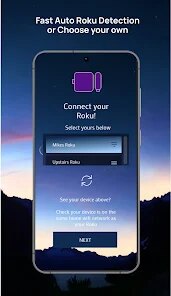
Using the app is pretty straightforward once you get the hang of it. After you install it from Google Play, you open it and select the type of device you want to control, like your TV, AC, or set-top box. Then, you pick the brand, and the app tries to sync with your device automatically. If that doesn't work, you can use the manual learning mode, which is a bit tedious but works. A tip I picked up is to point your phone directly at the device when doing the initial setup. It makes the connection more reliable. Also, don't forget to test the power button first before you set up everything else. There's a neat widget you can add to your home screen for quick access, which makes switching channels or adjusting the volume a one-tap job. I've found that keeping the app updated through Google Play ensures better compatibility with newer devices, so that's a habit I've gotten into.
Compared to other remote apps like AnyMote or Unified Remote, I keep coming back to Ai Smart Remote for a couple of reasons. First, it doesn't feel bloated with features I never use. AnyMote is powerful, sure, but it also feels like it needs a manual. This app just gets out of your way. Second, the learning function is much more reliable in my experience. I tried a couple of others, and they struggled with my off-brand media player, but this one figured it out after a few tries. It's not the flashiest tool, but it does the job without fuss, and that's why it's stayed on my phone.
features
- 📡 The IR blaster support is where this app really shines. Many modern phones have a built-in IR blaster, and this app uses it to its full potential. I compared it with ZaZa Remote, and while ZaZa is fine, Ai Smart Remote had a faster response time and a longer range. I could point my phone at the TV from across the room, and it would still register the command. ZaZa would sometimes miss a button press if I was too far away, which was annoying during movie nights.
- 🧠 The custom learning mode is a lifesaver for weird devices. I have an obscure, old DVD player that no other app on the Google Play store even recognizes. With Ai Smart Remote, I can teach it the specific IR codes using my original remote. You just point the original remote at the phone, press a button, and it learns it. This feature alone saved me from buying a new universal remote.
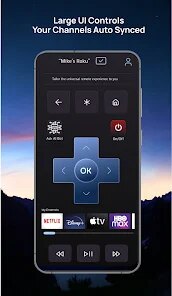
- 🎨 The interface is clean and customizable. You can resize the buttons on the virtual remote and change the background. It sounds minor, but it makes a big difference. Other apps like Universal TV Remote have a fixed layout that feels cramped on a smaller screen. With this app, I can set up a layout that puts the volume and channel controls right where my thumb rests, making it feel more natural than using a physical remote.
- ⚡ It has a built-in quick launch widget that works flawlessly. You don't have to open the app every single time. I just slap the widget on my home screen, and I can control the TV without even looking at the phone. It's a small thing, but it makes daily use so much smoother compared to other apps where you have to wait for the app to load first.
pros
- ✅ It is completely free to install from Google Play. You get the core functionality without paying a cent, unlike some apps that put the best features behind a paywall right away.
- ✅ The setup process is much faster than Competitor Remote Control. With that other app, I had to manually configure a lot of settings before anything worked. Here, it detected my TV brand instantly.
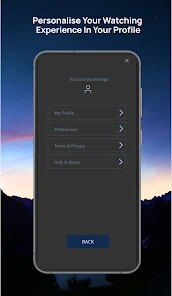
- ✅ It handles multiple devices in one profile. I have my TV, soundbar, and cable box all set up, and switching between them is instant. It feels more organized than using separate apps for each device.
- ✅ The ads are not as intrusive as you'd expect. Some apps throw a full-screen ad every few seconds, but this one just shows a small banner at the bottom, which is a small price to pay for a free download.
cons
- ❌ The free version still needs an internet connection for some features, even if you just want to use the IR blaster. It's an odd choice, especially when you compare it to other apps that work fully offline. It's not a dealbreaker, but it's annoying when my Wi-Fi is down.
- ❌ The app doesn't have a cloud backup for your custom remote layouts. If you uninstall the app or get a new phone, you have to set everything up from scratch. I've lost my custom settings once, and it was a pain to redo them.
- ❌ There are occasional bugs with the "auto-detect" feature from Google Play updates. Sometimes it just fails to recognize a device that it knew just fine before the update, forcing you to manually re-link it.
- ❌ The customer support within the app is basically nonexistent. If you run into a problem, you're on your own. There's no chat or email button, which is a letdown compared to bigger names like AnyMote that have a proper support forum.
Recommended Apps
![]()
Secret Crush Detector App
Hopeitz Software4.8

![]()
Anima
ChristopherMoore03.2![]()
Sam's Club: Shopping & Savings
Sam's Club4.8![]()
FunSwap - AI Face Swap
AI Tech Hub3.8![]()
Uber Eats: Food Delivery
Uber Technologies, Inc.4.6![]()
Air Horn Sounds : Siren Prank
AA Studio Game4.6![]()
Fontmaker - Font Keyboard App
Sociaaal LLC4.3![]()
Daily Horoscope 2024
Code Blenders4.3![]()
Bible Chat - Holy Bible Study
Book Vitals Inc.4.8![]()
Monster High Fangtastic Life
Budge Studios4.1![]()
Personalized Call from Santa (
www.PackageFromSanta.com4.3![]()
Daily Horoscope
KADO Apps4.4![]()
Does He Like Me?
KDR Games4.3![]()
Who Love You? Personality Test
BuzzForFun0![]()
Lisa AI: Cartoonify Avatar Art
Convert Software2.9















Hot Apps
-
![]()
Google Gemini
Google LLC4.6 -
![]()
Pinterest
Pinterest4.5 -
![]()
Afterpay - Buy Now Pay Later
Afterpay3.8 -
![]()
Zoom - One Platform to Connect
zoom.us4.1 -
![]()
PolyBuzz: Chat with AI Friends
CLOUD WHALE INTERACTIVE TECHNOLOGY LLC.3.8 -
![]()
Facebook
Meta Platforms, Inc.4 -
![]()
GroupMe
GroupMe4.5 -
![]()
Chai: Chat AI Platform
Chai Research Corp.4.3 -
![]()
Wise: International Transfers
Wise Payments Ltd.4.7 -
![]()
Google Pay
Google LLC4.4 -
![]()
Signal Private Messenger
Signal Foundation4.5 -
![]()
Snapchat
Snap Inc4.1 -
![]()
Google Chrome: Fast & Secure
Google LLC4.1 -
![]()
Netflix
Netflix, Inc.3.9 -
![]()
WhatsApp Messenger
WhatsApp LLC4.5 -
![]()
Affirm: Buy now, pay over time
Affirm, Inc4.7 -
![]()
ChatOn - AI Chat Bot Assistant
AIBY Inc.4.4 -
![]()
Pandora - Music & Podcasts
Pandora4.1 -
![]()
Cash App
Block, Inc.4.6 -
![]()
Geeni
Merkury Innovations4.6 -
![]()
Hulu: Stream TV shows & movies
Disney4.5 -
![]()
Amazon Fire TV
Amazon Mobile LLC4.1 -
![]()
Microsoft Teams
Microsoft Corporation4.6 -
![]()
PayByPhone
PayByPhone Technologies Inc .4.9 -
![]()
Ticketmaster-Buy, Sell Tickets
Ticketmaster L.L.C.3 -
![]()
GasBuddy: Find & Pay for Gas
PDI Software, Inc.3.1 -
![]()
Snapmint: Buy Now, Pay in EMIs
Snapmint4.5 -
![]()
Duolingo: Language & Chess
Duolingo4.7 -
![]()
Venmo
PayPal, Inc.4.2 -
![]()
ChatBot - AI Chat
X PhotoKit4.5











































