Easy Clean Pro

5M+
Installs
Limtech Developers
Developer
-
Productivity
Category
-
Everyone
Content Rating
-
theyoungeng@gmail.com
Developer Email
-
https://sites.google.com/view/ecpprivacy
Privacy Policy
Screenshots
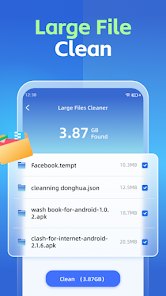
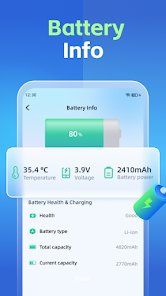
editor reviews
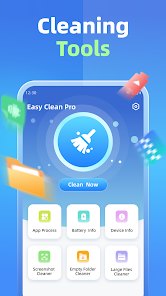
Easy Clean Pro is a utility app from Limtech Developers that helps you free up storage space on an Android phone. It falls into the phone cleaner and storage manager genre, and it first showed up on Google Play around 2020. There is no iOS version, so if you are on an iPhone this app is not for you. You can download it for free, and you do not need an account or registration to start using it. Ads are part of the deal, and there are some paid extras inside the app if you want them. Install counts sit in the millions on Google Play, and ratings hover around the four-star mark, which tells you plenty of people keep it on their phones after they download it. The app is aimed at everyday Android users who notice their phone slowing down or running out of space, especially people who take a lot of photos, keep lots of chat files, or use several social apps at once. Common scenes include clearing junk before a system update, deleting duplicate pictures after a trip, and checking what is eating up storage when the low-space warning pops up.
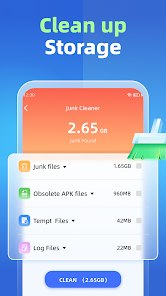
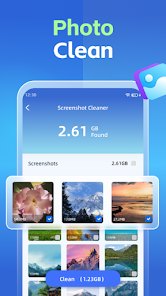
Using Easy Clean Pro is pretty straightforward. After you install the app and open it, it runs a scan and shows you what it found, usually split into junk files, cache, leftover files from uninstalled apps, and large files. You tap to clean, and that is mostly it. A few tips from someone who has used it a while: run the scan every week or two instead of waiting until your phone complains, and look through the results before you hit clean, because some files marked as junk are actually chat attachments you might want. Check the duplicate photo section carefully, since it groups similar shots and you could delete the one you meant to keep. If the app asks for storage permission, grant it, or the scan will come back almost empty. Also, turn off the notification reminders if they get annoying, and skip the paid upgrade unless you really need the extra tools, because the free version covers the basics fine.
I have tried a few of these cleaner apps, including CCleaner and the built-in cleaner that comes with some phones, and I stuck with Easy Clean Pro. The main reason is simple: it is fast and it does not nag me constantly. CCleaner feels heavier and pushes its paid version harder, and the system cleaner on my phone misses a lot of leftover files. Easy Clean Pro finds more junk without slowing everything down, and the layout makes sense even the first time you open it. I also like that it does not force me to sign up. For a free app I download from Google Play, that is a fair trade. It is not perfect, but it does the job I need it to do.
features
- 🧹 One-tap cleaning that actually works: the scan finds cache, leftover files, and junk in one pass, and cleaning takes a single tap. Compared with CCleaner, which buries the main clean button behind several screens, this one gets you there faster.
- 🖼️ Duplicate and similar photo finder: it groups near-identical shots so you can clear space without scrolling through your whole gallery. This is the feature I use most, and the free version handles it well.
- 📊 Storage breakdown by category: the app shows you what is taking up space in a simple chart, so you know where to start. Files by Google does something similar, but Easy Clean Pro adds large-file detection in the same view.
- ⚡ Light footprint: the app itself does not eat much storage or battery. Some cleaner apps end up being part of the problem, but this one stays out of the way until you open it.
pros
- 👍 Free core features: the cleaning tools you actually need cost nothing, while CCleaner locks more behind a paywall.
- 👍 No sign-up needed: you download and start cleaning right away, unlike some apps that push account creation.
- 👍 Simple interface: everything is on the home screen, which makes it easier to use than the cluttered menus in many rivals.
- 👍 Reliable duplicate finder: it catches similar photos better than Files by Google in my experience.
cons
- 👎 Ads in the free version: they show up between screens, and CCleaner is a bit less aggressive about this.
- 👎 Android only: there is no iOS build, so iPhone users have to look elsewhere.
- 👎 Paid upgrade prompts: the app keeps reminding you about premium tools, which gets old after a while.
- 👎 No real-time protection: unlike some security-focused cleaners, it only works when you open it and run a scan.
Recommended Apps
![]()
Secret Crush Detector App
Hopeitz Software4.8

![]()
Anima
ChristopherMoore03.2![]()
Sam's Club: Shopping & Savings
Sam's Club4.8![]()
FunSwap - AI Face Swap
AI Tech Hub3.8![]()
Uber Eats: Food Delivery
Uber Technologies, Inc.4.6![]()
Air Horn Sounds : Siren Prank
AA Studio Game4.6![]()
Fontmaker - Font Keyboard App
Sociaaal LLC4.3![]()
Daily Horoscope 2024
Code Blenders4.3![]()
Bible Chat - Holy Bible Study
Book Vitals Inc.4.8![]()
Monster High Fangtastic Life
Budge Studios4.1![]()
Personalized Call from Santa (
www.PackageFromSanta.com4.3![]()
Daily Horoscope
KADO Apps4.4![]()
Does He Like Me?
KDR Games4.3![]()
Who Love You? Personality Test
BuzzForFun0![]()
Lisa AI: Cartoonify Avatar Art
Convert Software2.9














Hot Apps
-
![]()
Google Gemini
Google LLC4.6 -
![]()
Pinterest
Pinterest4.5 -
![]()
Afterpay - Buy Now Pay Later
Afterpay3.8 -
![]()
Zoom - One Platform to Connect
zoom.us4.1 -
![]()
PolyBuzz: Chat with AI Friends
CLOUD WHALE INTERACTIVE TECHNOLOGY LLC.3.8 -
![]()
Facebook
Meta Platforms, Inc.4 -
![]()
GroupMe
GroupMe4.5 -
![]()
Chai: Chat AI Platform
Chai Research Corp.4.3 -
![]()
Wise: International Transfers
Wise Payments Ltd.4.7 -
![]()
Google Pay
Google LLC4.4 -
![]()
Signal Private Messenger
Signal Foundation4.5 -
![]()
Snapchat
Snap Inc4.1 -
![]()
Google Chrome: Fast & Secure
Google LLC4.1 -
![]()
Netflix
Netflix, Inc.3.9 -
![]()
WhatsApp Messenger
WhatsApp LLC4.5 -
![]()
Affirm: Buy now, pay over time
Affirm, Inc4.7 -
![]()
ChatOn - AI Chat Bot Assistant
AIBY Inc.4.4 -
![]()
Pandora - Music & Podcasts
Pandora4.1 -
![]()
Cash App
Block, Inc.4.6 -
![]()
Geeni
Merkury Innovations4.6 -
![]()
Hulu: Stream TV shows & movies
Disney4.5 -
![]()
Amazon Fire TV
Amazon Mobile LLC4.1 -
![]()
Microsoft Teams
Microsoft Corporation4.6 -
![]()
PayByPhone
PayByPhone Technologies Inc .4.9 -
![]()
Ticketmaster-Buy, Sell Tickets
Ticketmaster L.L.C.3 -
![]()
GasBuddy: Find & Pay for Gas
PDI Software, Inc.3.1 -
![]()
Snapmint: Buy Now, Pay in EMIs
Snapmint4.5 -
![]()
Duolingo: Language & Chess
Duolingo4.7 -
![]()
Venmo
PayPal, Inc.4.2 -
![]()
ChatBot - AI Chat
X PhotoKit4.5