
Subway®

10M+
Installs
SUBWAY Restaurants
Developer
-
Food & Drink
Category
-
Everyone
Content Rating
-
appreviews@subway.com
Developer Email
-
https://www.subway.com/en-US/Legal/PrivacyStatement-FWH
Privacy Policy
Screenshots
editor reviews
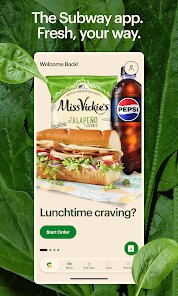
You know, if you are anything like me, you have probably spent way too much time staring at the usual fast-food app on your phone, trying to decide if you want the same old burger again. That is why the Subway app, developed directly by SUBWAY Restaurants, is a pretty solid alternative. It is the official app for the massive sandwich chain, and honestly, the whole thing functions as a convenient ordering tool and a loyalty program all wrapped into one neat package. You can use it to customize your footlong, place a pickup order, and track your rewards points without ever having to talk to a cashier.
The app has been out for a few years now, so it has gone through quite a few updates to squash the bugs from the early days. You can grab a download from the Google Play Store or the Apple App Store, and it is 100% free to install. According to the Google Play listing, the app has over 10 million installs, which tells you a lot of people are using it. Of course, you do have to create an account to place an order, but that is pretty standard for any food app these days. There are no crazy subscription fees to use the app itself, but the real cost comes from the food. You will find in-app purchases for your sandwiches, but you can also find limited-time offers that are exclusive to app users. If you are someone who grabs lunch on the go regularly, or maybe a student looking for a quick bite between classes, this app fits perfectly into that routine.
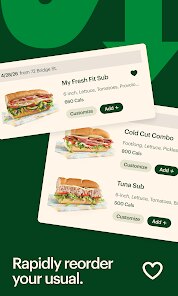
So, how do you actually use this thing? When you open the app, it drops you right onto a menu screen. The smartest way to use it is to actually save your usual orders, because nobody wants to rebuild a sandwich from scratch every single time. I usually just tap my saved “Chicken Bacon Ranch” and head straight to checkout. A big tip for making the app work for you is to use the “Order Ahead” feature. You can schedule a pickup for a specific time, which means you can walk right past the line and grab your bag from the counter. I have found that it saves a lot of time compared to standing there waiting. If you are near the restaurant, the app also uses your location to show you the closest one, which is handy for travellers.
When I compare it to other food apps, I actually prefer Subway over something like the McDonald's app. Not because McDonald's is bad, but because the Subway app feels less cluttered. The customization is way better, since you can modify every single ingredient. You can even add an extra slice of cheese without having to argue about it. Honestly, I choose this app because the rewards program is simpler to understand than some other apps that hide points behind complicated tiers. It just works for a quick lunch.
features
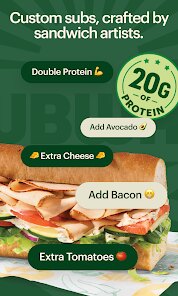
- 👍 Order Customization is Unmatched: This is honestly the main reason I use the Subway app instead of just walking in. You can scroll through each ingredient and add or remove things with a single tap. When you compare it to the Panera app, which also lets you customize, Subway feels faster because the interface is just a list of toggles rather than a bunch of dropdown menus. The outstanding feature here is the “Save as Favourite” option, which remembers every weird modification you made so you can reorder it with one button.
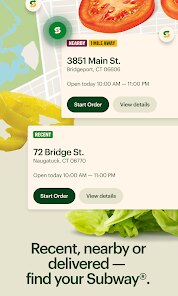
- 👍 True Location-Based Service: The app uses your GPS to find the nearest restaurant automatically. It is a small thing, but compared to other food apps like Domino's which sometimes defaults to a location miles away, the Subway app usually picks the right one based on your current spot. The outstanding feature is the “Get Directions” button built into the order screen so you can just tap it and start walking.
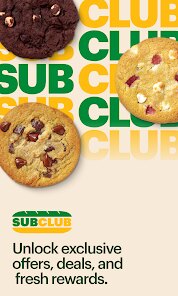
- 👍 Simple Rewards Tracking: The SUBWAY Rewards program inside the app is very straightforward. Every purchase gets you points that translate into free food. Unlike the Chipotle app, where the rewards feel like you need a spreadsheet to figure out what you earned, this one just shows a simple counter. The outstanding feature is the “Boost” offers which double your points for a specific sandwich type, making it easier to earn a free sub faster.
pros
- 💪 Fewer Bugs, More Stability: I have used the Wendy's app in the past, and it crashes sometimes when you try to pay. The Subway app is more stable on my phone. It rarely freezes during the checkout process, which is a big strength when you are hungry and in a hurry.
- 💪 Exclusive Customer Perks: The app gives you access to coupons and freebies that you cannot get in the store or on the website. I have gotten a free cookie code just for opening the app on a Tuesday, which is something you won't find in the Starbucks app as often.
- 💪 Saves Your Order History: You can see every single sub you ordered for the past year. This is great for replicating orders or just seeing how much you usually spend. Other apps like Burger King clear your history after a few months.
cons
- 👎 Limited Payment Options: The app is great, but it does not support digital wallets like Google Pay in all locations. I have had to dig out my debit card at the register when the contactless payment failed, which my old favorite, the Raising Cane's app, handles better.
- 👎 Slow Notification Updates: Sometimes the app tells me my order is ready 5 minutes after I have already picked it up. The Chick-fil-A app is much better at real-time alerts that actually match the time the food is bagged.
- 👎 Occasional GPS Drift: If you are in a big city with tall buildings, the app sometimes thinks you are at a different Subway location than the one you are standing at. This is a known glitch that I have reported but it still pops up now and then.
Recommended Apps
![]()
Secret Crush Detector App
Hopeitz Software4.8

![]()
Anima
ChristopherMoore03.2![]()
Sam's Club: Shopping & Savings
Sam's Club4.8![]()
FunSwap - AI Face Swap
AI Tech Hub3.8![]()
Uber Eats: Food Delivery
Uber Technologies, Inc.4.6![]()
Air Horn Sounds : Siren Prank
AA Studio Game4.6![]()
Fontmaker - Font Keyboard App
Sociaaal LLC4.3![]()
Daily Horoscope 2024
Code Blenders4.3![]()
Bible Chat - Holy Bible Study
Book Vitals Inc.4.8![]()
Monster High Fangtastic Life
Budge Studios4.1![]()
Personalized Call from Santa (
www.PackageFromSanta.com4.3![]()
Daily Horoscope
KADO Apps4.4![]()
Does He Like Me?
KDR Games4.3![]()
Who Love You? Personality Test
BuzzForFun0![]()
Lisa AI: Cartoonify Avatar Art
Convert Software2.9















Hot Apps
-
![]()
Google Gemini
Google LLC4.6 -
![]()
Pinterest
Pinterest4.5 -
![]()
Afterpay - Buy Now Pay Later
Afterpay3.8 -
![]()
Zoom - One Platform to Connect
zoom.us4.1 -
![]()
PolyBuzz: Chat with AI Friends
CLOUD WHALE INTERACTIVE TECHNOLOGY LLC.3.8 -
![]()
Facebook
Meta Platforms, Inc.4 -
![]()
GroupMe
GroupMe4.5 -
![]()
Chai: Chat AI Platform
Chai Research Corp.4.3 -
![]()
Wise: International Transfers
Wise Payments Ltd.4.7 -
![]()
Google Pay
Google LLC4.4 -
![]()
Signal Private Messenger
Signal Foundation4.5 -
![]()
Snapchat
Snap Inc4.1 -
![]()
Google Chrome: Fast & Secure
Google LLC4.1 -
![]()
Netflix
Netflix, Inc.3.9 -
![]()
WhatsApp Messenger
WhatsApp LLC4.5 -
![]()
Affirm: Buy now, pay over time
Affirm, Inc4.7 -
![]()
ChatOn - AI Chat Bot Assistant
AIBY Inc.4.4 -
![]()
Pandora - Music & Podcasts
Pandora4.1 -
![]()
Cash App
Block, Inc.4.6 -
![]()
Geeni
Merkury Innovations4.6 -
![]()
Hulu: Stream TV shows & movies
Disney4.5 -
![]()
Amazon Fire TV
Amazon Mobile LLC4.1 -
![]()
Microsoft Teams
Microsoft Corporation4.6 -
![]()
PayByPhone
PayByPhone Technologies Inc .4.9 -
![]()
Ticketmaster-Buy, Sell Tickets
Ticketmaster L.L.C.3 -
![]()
GasBuddy: Find & Pay for Gas
PDI Software, Inc.3.1 -
![]()
Snapmint: Buy Now, Pay in EMIs
Snapmint4.5 -
![]()
Duolingo: Language & Chess
Duolingo4.7 -
![]()
Venmo
PayPal, Inc.4.2 -
![]()
ChatBot - AI Chat
X PhotoKit4.5











































